PhoneAudioLink
Project Status
Functional! Core A2DP audio streaming works. Media controls need implementation, and, as usual, some bugs need fixing! See Known Issues and Future Enhancements.
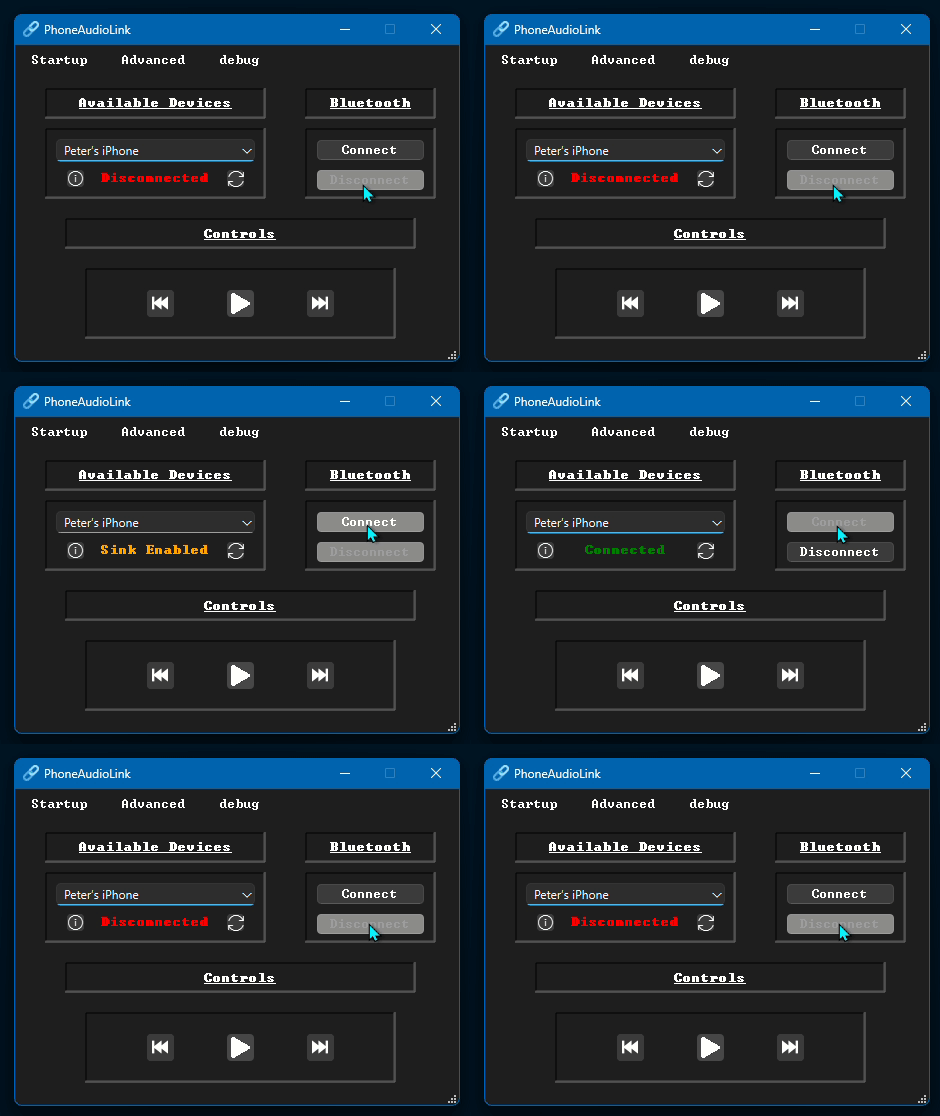
Stream Bluetooth audio from your phone to your PC
PhoneAudioLink is a Windows desktop application that turns your PC into a Bluetooth A2DP audio sink, meaning you can stream music, podcasts, or any audio from your phone directly to your computer's speakers. Think of it like using your PC as a Bluetooth speaker, without needing a bluetooth speaker cluttering your desk.
Features
| Feature | Description |
|---|---|
| A2DP Audio Streaming | Receive Bluetooth audio from your phone and play it through your PC speakers, using Windows' native AudioPlaybackConnection API. |
| Device Discovery | Automatically discovers nearby Bluetooth devices. Filter for phones only, or toggle compatibility mode to show everything. |
| System Tray | Minimizes to tray so it stays out of the way. Click to restore, middle-click to exit. |
| Persistent Settings | Remembers your selected device, compatibility mode, and startup preferences across restarts via init.json. |
| Volume Mixer Branding | Appears in the Windows Volume Mixer with its own name and icon instead of the generic "Microphone" label, via WASAPI. |
| Auto-Update Checker | Checks for updates on launch and shows a notification bar (Qt Creator-style) with release notes and a one-click update button. |
| Animated Controls | Play/pause button crossfades between states. Icons adapt to light/dark system theme. |
Media Controls
- The buttons exist and animate, but the commands don't actually reach the phone yet. See Known Issues.
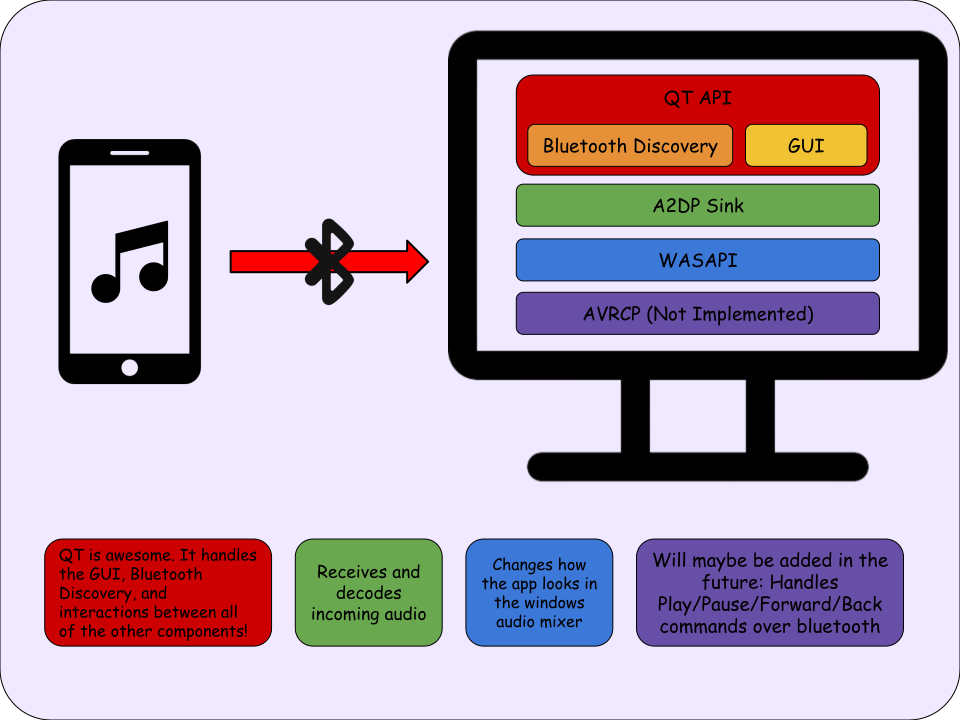
Architecture
System Diagram
Why Does This Exist?
Windows doesn't natively expose an easy way to receive Bluetooth audio from a phone. You can send audio to Bluetooth headphones, but acting as a receiver? That requires wrangling with Microsoft's AudioPlaybackConnection API, which is buried deep in the WinRT framework and has basically zero user-friendly UI.
I wanted a simple, clean way to stream my phone's audio to my PC. So I built one.
Design Decisions
Why Not Qt Bluetooth Sockets?
The original version of this project tried to implement A2DP from scratch using QBluetoothSocket with RFCOMM. This was fundamentally wrong since A2DP requires L2CAP sockets, AVDTP, and codec negotiation (SBC, AAC, etc.), none of which Qt exposes. After hitting that wall, I shelved the project for about a year.
Let Windows Do the Heavy Lifting
The current architecture delegates all Bluetooth audio handling to Windows' native AudioPlaybackConnection API (WinRT). This means Windows handles codec negotiation, audio routing, and stream management and the app just tells it when to connect and to what. Much more reliable than trying to reimplement Bluetooth from scratch  .
.
Volume Mixer Requires Session Hunting
When AudioPlaybackConnection creates an audio stream, Windows labels it generically as "Microphone" in the Volume Mixer. To fix this, the AudioSessionManager class uses WASAPI's IAudioSessionManager2 to enumerate both capture and render sessions, find the one belonging to our process, and rename it. This was surprisingly difficult, as the session appears under capture (not render) because audio is coming from the phone.
Software
Tech Stack
| Layer | Technology | Role |
|---|---|---|
| UI | Qt 6 (Widgets) | Device selection, playback controls, system tray |
| Bluetooth Discovery | QBluetoothDeviceDiscoveryAgent |
Finds nearby phones |
| A2DP Sink | Windows AudioPlaybackConnection API (WinRT) |
Receives and decodes Bluetooth audio natively |
| Audio Session | WASAPI (IAudioSessionManager2) |
Customizes Volume Mixer appearance |
| Media Controls | AVRCP (in progress) | Play/pause/skip on the connected phone |
| Installer | Qt Installer Framework | Online installer with auto-update support |
Directory Structure
Project Tree
PhoneAudioLink/
├── installer/
|   ├── config/...                          // Qt IFW installer configuration
|   ├── packages/...                        // Installer package data
|   └── repository/...                      // These files get transferred to polimorph-dev*
├── .gitignore
├── README.md
├── PhoneAudioLink.pro                      // Main project file
├── main.cpp                                // Driver
├── phoneaudiolink.h                        // Main window header
├── phoneaudiolink.cpp                      // Bulk of the UI logic
├── phoneaudiolink.ui                       // Qt Designer form
├── bluetootha2dpsink.h                     // WinRT AudioPlaybackConnection wrapper
├── bluetootha2dpsink.cpp                   // A2DP sink management
├── audiosessionmanager.h                   // WASAPI session customization
├── audiosessionmanager.cpp                 // Volume Mixer branding logic
├── animatedbutton.h                        // Animated play/pause button
├── animatedbutton.cpp                      // Crossfade animation + theme-aware icons
├── startuphelp.h                           // Startup instructions dialog
├── startuphelp.cpp
├── updatechecker.h                         // Background update checking
├── updatechecker.cpp
├── updatenotificationbar.h                 // Qt Creator-style update banner
├── updatenotificationbar.cpp
├── releasenotesdialog.h                    // Markdown release notes viewer
├── releasenotesdialog.cpp
├── a2dpstreamer.h                          // DEPRECATED — original RFCOMM approach
├── a2dpstreamer.cpp                        // DEPRECATED — does not work
├── resources.qrc                           // Icons, images
└── icon.ico
Core Logic
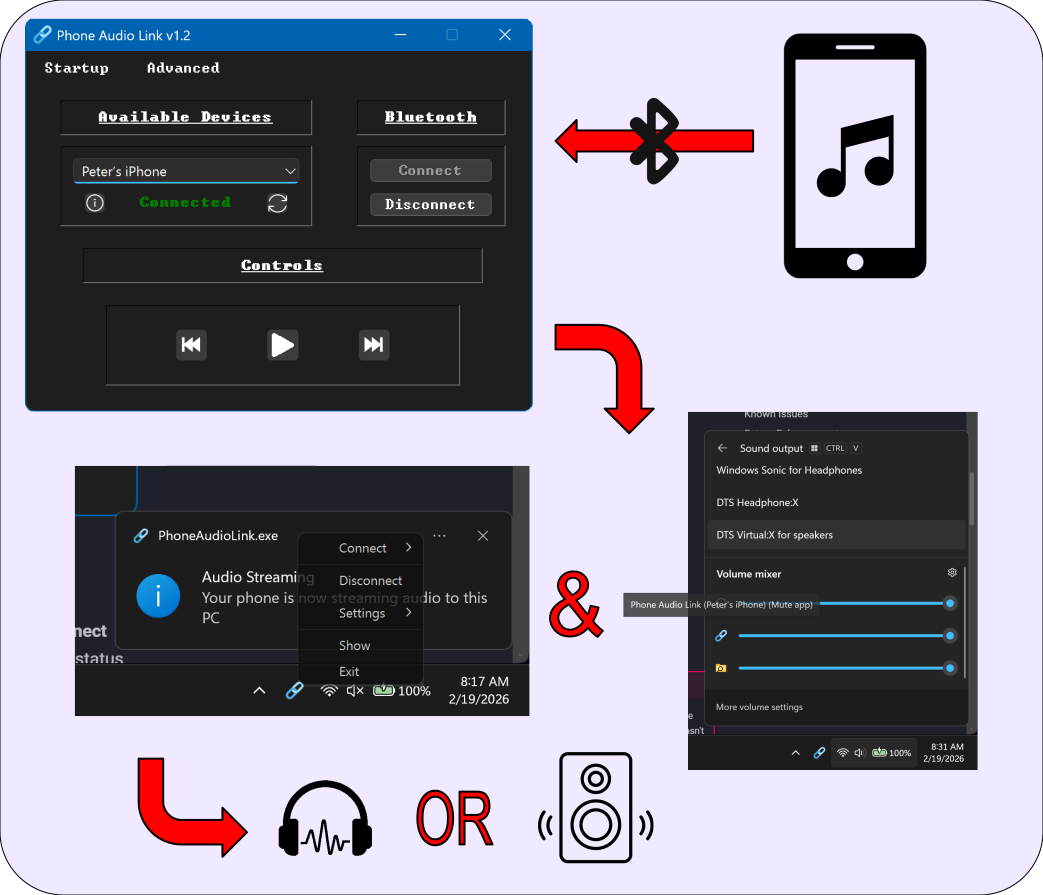
The connection flow is straightforward once you understand the WinRT async model:
- Discovery:
QBluetoothDeviceDiscoveryAgentfinds nearby devices. The app filters for phone devices by default (checkingmajorDeviceClass() == PhoneDevice), but compatibility mode shows everything. - Sink Creation: When the user clicks Connect,
BluetoothA2DPSinkcallsAudioPlaybackConnection::TryCreateFromId()with the device's WinRT ID, registering the PC as an A2DP sink. - Enable & Open:
StartAsync()enables the sink, thenOpenAsync()begins audio streaming. Both are WinRT coroutines, bridged back to Qt's thread viaQMetaObject::invokeMethod. - Session Branding: After connecting,
AudioSessionManageruses WASAPI to find and rename the audio session in the Volume Mixer from "Microphone" to "Phone Audio Link (device name)". - Cleanup: On disconnect, COM objects are released in order. Lazy initialization and aggressive cleanup were added since the process would sometimes hang during debug.
Data Flow
Installation
Requirements
- Windows 10 version 2004 or later
- A Bluetooth-compatible computer (either built-in or USB dongle)
- PhoneAudioLink Installer (latest release from GitHub)
- Qt 6.2+ with Bluetooth and Multimedia modules
- QT Creator (easiest)
- MSVC compiler with C++20 support (for WinRT coroutines)
- Windows SDK 10.0.19041.0 or later
Build Instructions
Only needed if building from source
- Open
PhoneAudioLink.proin QT Creator - Select the MSVC kit
- Hit Play to build & run
.pro additions for WinRT support
Configuration
Configuration is stored in a single JSON file:
Created automatically in the app's working directory on first exit.
| Key | Type | Description |
|---|---|---|
maximizeBluetoothCompatability |
bool |
Show all Bluetooth devices instead of just phones |
connectAutomatically |
bool |
Auto-connect to the saved device on launch (not yet implemented) |
startMinimized |
bool |
Launch straight to the system tray |
device |
string |
Bluetooth MAC address of the last selected device |
Quick Start
Let's get streaming...
- Pair your phone with your PC via Windows Bluetooth settings (do this first!)
- Launch PhoneAudioLink
- Select your phone from the device dropdown (hit the refresh button if it doesn't appear)
- Click Connect! The status label should turn green and say "Connected"
- Play something on your phone - audio should come through your PC speakers
- (Optional) Check options under the
Advancedmenu for compatibility mode, start minimized, etc.
Troubleshooting
My phone doesn't show up in the device selection box!
- Did you pair it in windows settings before starting the app? If not, do so.
- Select "Forget this device" in the windows bluetooth settings for your phone, and re-pair. Refresh or re-start the app.
No audio plays even though it says connected!
- Check the volume on both your phone and PC.
- Disconnect & Reconnect your phone using the buttons in the UI.
- Restart the app.
Known Issues
Media Controls Don't Work
The play/pause, forward, and back buttons don't control the phone. When the PC is an A2DP Sink (receiving audio), Windows doesn't automatically establish an AVRCP Controller connection. The current SendInput media key approach only controls local Windows media apps, not the phone. A proper AVRCP implementation is planned.
Process Hangs on Exit (Debug Builds)
The UI and tray icon disappear, but the process lingers in Task Manager under "Background processes." Caused by COM objects (WASAPI) and/or WinRT async operations not being fully released before QApplication::quit(). Mitigated with lazy initialization and aggressive cleanup, but not fully resolved. This does not happen in release builds, however.
Crash on Minimize (Intermittent)
A GitHub user reported the app crashing when minimized. The suspected cause is saveInitData() accessing the device combo box when it's empty or has no valid QBluetoothDeviceInfo data. A guard has been added, but the bug hasn't been fully reproduced.
Duplicate Connection Notification
The "streaming audio" notification fires twice on connect. AudioPlaybackConnection emits multiple state change events that both trigger the connectionOpened signal.
Broken Icons
On some computers, icons may appear like this:

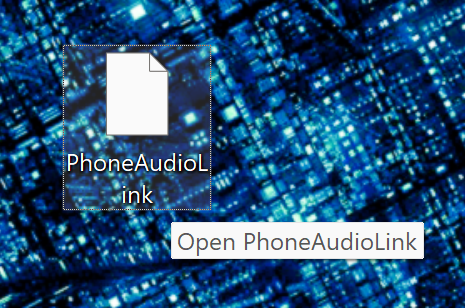
This is a low priority fix.
Debugging
Useful Debug Actions FOR DEBUG BUILDS ONLY
The Advanced → Debug menu action prints to console:
- The currently selected device name
- Its pairing status with the local Bluetooth adapter
- Its advertised service UUIDs
Helpful for diagnosing why a device won't connect or isn't being discovered.
Future Enhancements
AVRCP Controller
This is the big one. To actually control phone playback from the PC, the app needs to act as an AVRCP Controller and send properly formatted binary commands over an RFCOMM connection. This involves:
- Establishing an RFCOMM socket to the phone's AVRCP Target service
- Constructing valid AVRCP command packets (play, pause, next, previous)
- Parsing AVRCP response and notification packets
- Displaying track metadata (title, artist, album) in the UI
- Handling album art retrieval (multi-packet assembly)
The groundwork for this has been thought out but not yet integrated. Claude estimates it will take 3,000 lines of code  to implement, so this may never actually get implemented!
Other Planned Features
- Volume control integration: adjust phone volume from the PC
- Connection history: remember and quick-select previously connected devices
- Keyboard shortcuts: global hotkeys for media controls
- UI state management: grey out buttons when disconnected, change label text dynamically based on state
- Linux support: BlueZ via D-Bus for A2DP sink functionality (long-term future like years)
Resources
References
- AudioPlaybackConnection API (Microsoft Docs)
- WASAPI IAudioSessionManager2 (Microsoft Docs)
- AVRCP Specification (Bluetooth SIG)
Related Projects
- USB Soundboard: another Qt project with system tray integration, similar config persistence, and shared
StartupHelpdialog code
Project History
| When | What |
|---|---|
| ~2022 | Initial development using QBluetoothSocket with RFCOMM. Hit a wall — wrong protocol stack entirely. |
| ~2023 | Project shelved. |
| Late 2024 | Revived with a new architecture using Windows' native AudioPlaybackConnection API. Core streaming works. |
| Late 2024 | Added Volume Mixer customization (WASAPI), system tray, settings persistence, installer, auto-update system. |
| Ongoing | AVRCP Controller implementation for media controls. Bug fixes. |
Changelog
TODO
update to use the new TODO fence
v1.0.0 — 2024
Latest
- A2DP audio streaming via
AudioPlaybackConnection - Bluetooth device discovery with phone filtering
- System tray integration
- Settings persistence (
init.json) - Custom Volume Mixer branding via WASAPI
- Animated play/pause button with theme awareness
- Auto-update checker with release notes dialog
- Qt IFW online installer with optional desktop shortcut
- Initial release

Contributing
Found a bug or have a feature request?
Made with ☕ by PolymorphicAgent